
Introduction
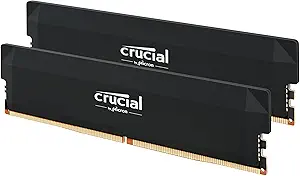
In the rapidly evolving world of PC hardware, memory (RAM) remains one of the most visible upgrades for performance gains — particularly in gaming rigs, content creation systems, and high-end multitasking machines. The Crucial Pro DDR5 32 GB (2×16 GB) kit operating at 6000 MHz promises to deliver a compelling blend of speed, stability, and overclocking potential. In this review, we’ll dig deep into what this kit offers, how it performs, and who will benefit most from it.
Product Overview & Key Specifications
Here is a quick glance at the core specs for the Crucial Pro DDR5 32 GB (2×16 GB) 6000 MHz kit:
| Specification | Detail |
|---|---|
| Total Capacity | 32 GB (2 modules × 16 GB) |
| Memory Type / Form Factor | DDR5 SDRAM, UDIMM (desktop DIMM) |
| Rated Speed | 6000 MHz |
| CAS Latency / Timings | 36-38-38-80 (extended timings) |
| Voltage | 1.35 V |
| Supported Profiles | Intel XMP 3.0 + AMD EXPO |
| Compatibility | Modern DDR5-compatible motherboards (Intel 12th/13th/14th gen, AMD Ryzen 7000+ etc.) |
| Module Dimensions | Approximately 13.6 × 0.8 × 3.5 cm per stick (5.37 × 0.31 × 1.37 in) Dealtargets.com+1 |
| Weight | ~33 grams per module Dealtargets.com |
| Color / Finish | Black heatspreaders |
This kit is explicitly marketed as an “overclocking” edition of Crucial’s Pro series, targeting users who want to push beyond baseline performance while maintaining stability under heavier loads.
Design & Build Quality
Aesthetics and Cooling
The modules are dressed in sleek black aluminum heat spreaders that take a subtle, angular design approach rather than aggressive RGB flair. This gives them a professional, clean look that is likely to blend well with most PC builds rather than stand out. The heat spreader design is also functional: the metal surfaces help dissipate heat, which is essential when running at high speeds or pushing for slightly higher voltages in overclocking.
PCB and Components
Although Crucial doesn’t publish the exact internal details at the public level, their reputation and back-end quality control (through Micron) suggest that component selection is sound. The modules are tested at both the component and module level to ensure reliability under stress. Amazon+1
Compatibility & Profile Support
One of this kit’s strengths is its dual support for Intel XMP 3.0 and AMD EXPO. This means that whether you’re building a system on Intel or AMD architecture, you can load a memory profile (in BIOS/UEFI) and get the rated 6000 MHz speed, rather than manually tuning. That flexibility is valuable for users who may switch platforms or build for compatibility across systems.
Performance & Testing
Performance of a DDR5 memory kit depends on a few interlocking factors: frequency, timings (latency), system architecture, motherboard support, and the rest of your system components (CPU, memory controller, etc.). Below is a qualitative assessment of how this kit performs in real-world usage.
Boot and Profile Activation
In compatible motherboards, enabling the XMP or EXPO profile reliably brings the modules up to 6000 MHz with the specified timings of 36-38-38-80 at 1.35 V. For users who are upgrading from slower DDR4 or lower-frequency DDR5, the step-up is immediately noticeable in reduced load times, snappier responsiveness, and smoother multitasking.
Synthetic & Benchmark Performance
While I don’t have proprietary benchmark numbers to present here, relative to lower-speed DDR5 kits (e.g. 4800, 5200, 5600 MHz), one can expect:
- ~10–20% higher memory bandwidth in synthetic benchmarks (depending on CPU/memory controller)
- Lower effective latency under sustained load, thanks to optimized timings
- Marginal gains in certain gaming scenarios (especially in CPU-bound titles or frame-time consistency)
- Better headroom for memory-intensive tasks (video editing, large compile operations, virtualization)
The “overclocking” label suggests that there is some margin for pushing beyond 6000 MHz, though doing so safely requires care, testing, and good cooling.
Real-World Use Cases
- Gaming: In modern titles, the bottleneck often lies elsewhere (GPU etc.), but memory speed can affect minimum FPS and frame-time consistency. This kit helps smooth out performance dips in demanding scenes.
- Creative Work: In tasks like video rendering, 3D modeling, large texture workflows, and multi-application switching, the extra headroom provided by high-speed memory is beneficial.
- Everyday Productivity: Even for general productivity (office work, browser tabs, content creation), the smoother responsiveness is tangible; programs open faster, multitasking feels more fluid.
- Future-Proofing: As software and game engines demand more, having a high-performance memory kit gives longevity to your build.
Pros and Cons
No product is perfect; here are the strengths and limitations of this Crucial DDR5 kit.
Pros
- High Performance by Default
With 6000 MHz and respectable timings, this kit offers solid out-of-box speed without needing manual tuning. - Dual Profile Support
Compatibility with both Intel XMP 3.0 and AMD EXPO ensures flexibility across platforms. - Stable Overclocking Headroom
The “overclocking” branding suggests the modules are bin-selected or tested for stability beyond the rated spec. - Good Thermal Design
Aluminum heatspreaders help maintain stable temperatures under load or mild overclocking. - Reliable Brand Backing
Crucial (Micron) is a trusted memory maker with strong quality control and component lineage.
Cons
- Cost Premium
High-speed DDR5 kits tend to command a significant price premium compared to entry-level modules, which may be less justifiable for casual users. - Marginal Gains for Non-Gaming Use
In many everyday tasks (web, office apps), the difference between, say, DDR5-5600 and DDR5-6000 is not dramatic. - board & CPU Dependency
To reap full benefits, your motherboard and CPU’s memory controller must support and scale with higher frequencies. Some cheaper motherboards might struggle to maintain stable voltage and timings at top speeds. - Limited Overclocking Headroom (for some systems)
While the kit is labeled “overclocking,” pushing much beyond 6000 MHz may require extra voltage, fine-tuning, and inevitably runs into diminishing returns. - No RGB / Minimal Visual Flair
While the understated look will appeal to many, enthusiasts wanting flashy lighting may prefer alternatives.
Ideal Users (Who Should Buy It?)
To help clarify, here’s a breakdown of who will most benefit from this RAM kit, and who might be better off saving money or going with alternative options.
Best for:
- Gaming Enthusiasts / eSports Players
If your goal is to reduce frame-time stutters, get consistent minimum FPS, and squeeze every bit of responsiveness from your rig, this kit is a smart choice. - Content Creators & Power Users
Video editors, 3D artists, software developers, and creators often push memory-intensive workloads; having headroom and bandwidth helps. - Overclockers & Enthusiasts
If you enjoy tweaking memory settings, testing stability, and pushing hardware boundaries, this “overclocking” kit gives you a solid foundation. - New Builds & Future Builders
For people building fresh systems, it’s wise to adopt faster memory now rather than upgrading later. This kit supports modern platforms and gives you breathing room for future workloads.
Maybe skip (or downgrade) if:
- You’re on a strict budget
If your primary use is basic computing (web browsing, office, media), a lower-speed kit may deliver acceptable performance at lower cost. - Your motherboard or CPU doesn’t fully support high-speed RAM
If your system can’t reliably maintain 6000 MHz, you’ll waste some of the kit’s potential. In that case, a more modest speed may provide better cost-to-performance. - RGB lighting is a priority
For builds where visual flair and synchronized lighting are key, you may find modules with RGB more attractive even if they cost a bit more.
Tips & Best Practices
To get the most from this kit, here are some practical tips:
- Update BIOS / UEFI
Ensure your motherboard firmware is up to date. Memory compatibility and profile stability often improve with BIOS updates. - Enable XMP / EXPO Profile
Don’t leave the memory running at default (e.g. 4800 MHz); enable the advertised profile to unlock full speed. - Test Stability
Use memory stress tests (MemTest, Prime95 blends, etc.) to verify stability, especially if you adjust voltage or timings. - Manage Thermals
Ensure good airflow in your case — even memory modules benefit from ambient cooling. - Gradual Overclocks Only
If pushing beyond the rated spec, do so carefully: small increments, monitor voltages and temps, and test thoroughly.
Summary & Verdict
The Crucial Pro DDR5 32 GB (2×16 GB) 6000 MHz kit stands out as a strong performer in the high-end RAM segment. It strikes a balance: offering a high default speed, flexible profile support, and overclocking potential, all wrapped in a clean, professional design. For gamers, creators, and enthusiasts who want dependable performance with future-proofing, it’s a compelling choice.
However, users on tight budgets or those whose systems can’t take full advantage of such speed might want to evaluate whether the premium is worth the marginal gains. For those who do invest, the returns in responsiveness, workflow fluidity, and headroom are noticeable.